
 Sign in
OpenAI Models Explained: Complete Guide to AI Models, Their Capabilities, and How to Use Them in Your Platform
Artificial Intelligence has transformed how modern platforms operate. Tasks that once required hours of manual work, including writing articles, analyzing information, generating images, processing documents, answering questions, and automating workflows, can now be performed with the help of AI models.
Among the leading AI providers, OpenAI offers a comprehensive ecosystem of models designed for different purposes. However, not every model is designed to perform every task equally well.
Some models are optimized for complex reasoning, others for fast responses, and specialized models handle image generation, audio processing, transcription, and text embeddings.
For developers and businesses building AI-powered platforms, understanding these differences is essential.
The real opportunity is not simply connecting an AI API. It is building an intelligent system that selects the most appropriate model for each task, delivers reliable results, and avoids unnecessary API expenses.
In this guide, we will explore OpenAI's model ecosystem, explain the purpose of each major model category, and discuss how to integrate these capabilities into a production platform.
1. Understanding OpenAI's Model Ecosystem
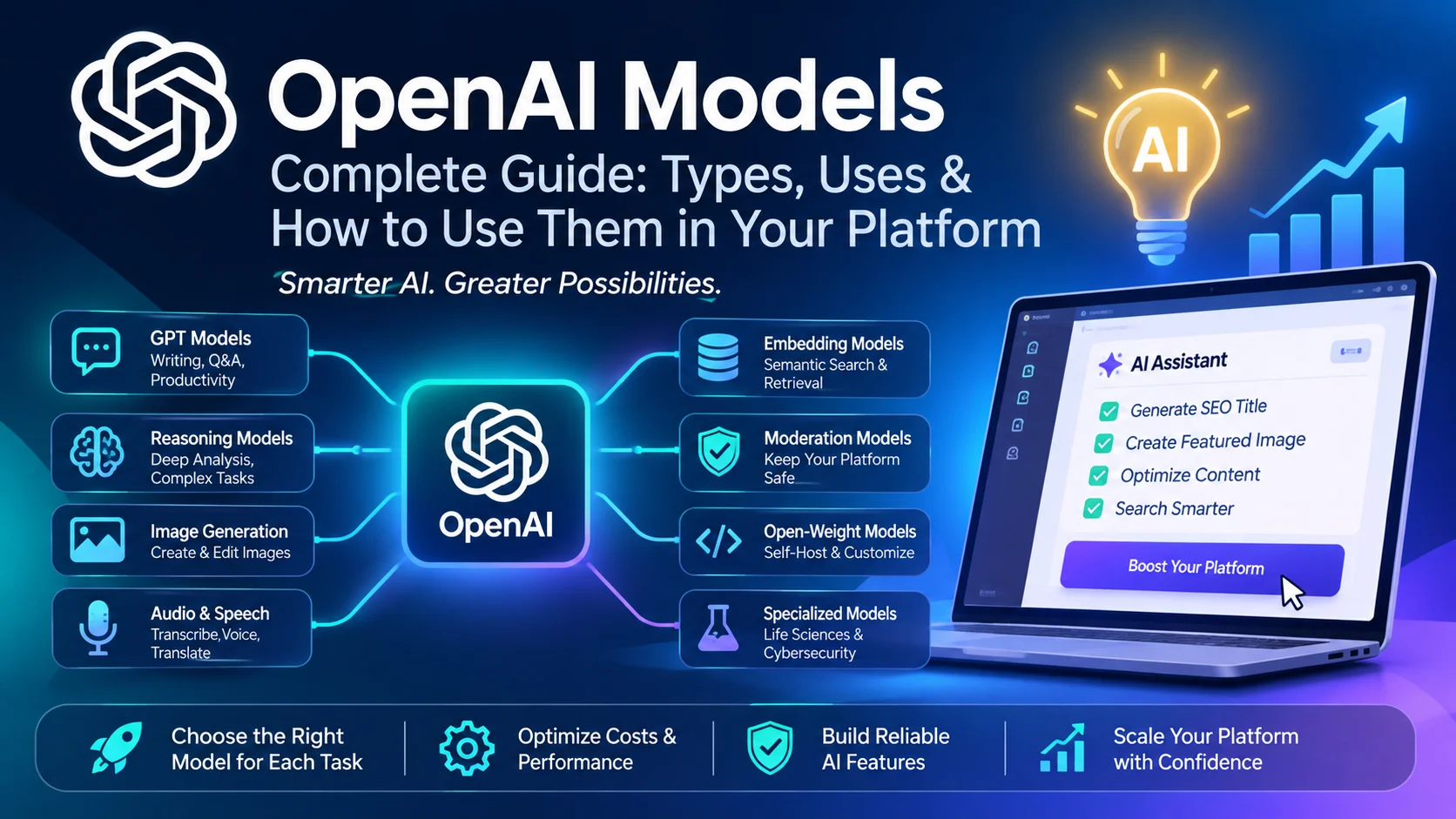
OpenAI provides multiple model families rather than relying on a single universal model.
The major categories include:
- General-purpose GPT models
- Advanced reasoning models
- Image generation and editing models
- Audio and speech models
- Embedding models
- Open-weight models
- Specialized scientific and cybersecurity models
- Moderation models
Each category solves a different type of problem.
1.1 General-Purpose GPT Models
GPT models are designed to handle a broad range of tasks, including:
- Content writing and rewriting
- Summarisation and explanations
- Question answering
- Programming assistance
- Data extraction
- Translation
- Image understanding
- Structured content generation
The flagship GPT family is particularly useful when a platform needs an AI assistant that can perform multiple types of tasks.
The current flagship lineup includes:
| ModelMain purpose | |
| GPT-6 Astra | Most demanding reasoning, coding, research, and agentic tasks |
| GPT-6.1 Sol | Advanced capabilities with a lower cost |
| GPT-6.1 Terra | Efficient visual reasoning, computer use, and writing |
| GPT-6 Luna | High-volume, cost-sensitive tasks |
These models are not interchangeable in every situation. The most capable model may produce better results for complicated tasks, but a smaller, faster model can be more economical for routine operations.
Recommended applications:
- AI writing assistants
- Customer support
- Content optimization
- Programming assistants
- Business automation
- Research and analysis
1.2 Advanced Reasoning Models
Reasoning models are designed for tasks that require deeper analysis, planning, and multi-step problem-solving.
Unlike simple text-generation workflows, these models can spend additional computation evaluating alternatives and working through complicated problems before producing an answer.
They are particularly useful for:
- Complex mathematical problems
- Scientific analysis
- Multi-step research
- Advanced programming
- Technical troubleshooting
- Business analysis
- Complex automation workflows
For example, imagine a user submits a technical article and asks an AI assistant to identify factual inconsistencies, evaluate the structure, find missing explanations, and suggest improvements.
A reasoning model is a better candidate for this type of comprehensive analysis than a lightweight model designed for simple text transformations.
Recommended applications:
Use advanced reasoning when the task genuinely requires analysis. Avoid assigning it to every request because additional reasoning can increase processing time and cost.
1.3 Image Generation Models
OpenAI also provides dedicated models for generating and editing images.
The GPT Image family includes:
- GPT-Image-2.5 Sunburst: Advanced image generation and editing.
- GPT-Image-2.5 Flare: Faster everyday image generation.
- GPT-Image-2: Image generation and editing capabilities.
These models can support workflows such as:
- Generating blog featured images
- Creating marketing graphics
- Designing illustrations
- Editing existing images
- Producing visual assets for articles
- Creating promotional artwork
For example, a content publishing platform could allow authors to enter an article title and description, then generate a suitable featured image without leaving the editor.
Image generation should be implemented as a separate capability rather than treating it as an ordinary text-generation request.
1.4 Audio and Speech Models
Audio models make it possible to build voice-enabled applications and automated speech-processing workflows.
OpenAI's audio ecosystem includes models for realtime conversations, speech-to-text, text-to-speech, and translation.
Important model categories include:
| ModelPurpose | |
| GPT-Live 1 | Natural, expressive voice conversations |
| GPT-Realtime-2.1 | Realtime audio workflows with reasoning and tool use |
| GPT-Realtime-2.1 Mini | More efficient realtime workflows |
| GPT-Realtime-Translate | Streaming speech translation |
| GPT-Transcribe | High-accuracy transcription |
| GPT-Live-Transcribe | Low-latency transcription |
| GPT-Audio-1.5 | Audio input and output workflows |
Possible platform applications include:
- Voice-based AI assistants
- Audio transcription
- Meeting summarization
- Voice search
- Speech translation
- Accessibility features
- Voice-enabled customer support
A platform should select an audio model according to whether it needs transcription, speech generation, or a complete realtime conversation.
1.5 Embedding Models
Embedding models convert text into numerical representations called vectors.
These vectors allow applications to compare the semantic meaning of text rather than simply matching identical keywords.
OpenAI provides embedding models including:
text-embedding-3-largetext-embedding-3-smalltext-embedding-ada-002(legacy)
Embeddings are particularly valuable for platforms containing large collections of articles, documents, products, or technical information.
For example, suppose a user searches for:
"How can I reduce the size of a PDF without losing too much quality?"
A traditional keyword search may look for the exact words used in the query.
A semantic search system can also retrieve content about PDF compression, image optimization, and document size reduction, even when the wording is different.
Recommended applications:
- Semantic search
- Article recommendations
- Related content discovery
- Knowledge-base search
- Retrieval-Augmented Generation (RAG)
- Document classification
For new projects, text-embedding-3-small is a sensible starting point when cost efficiency matters, while text-embedding-3-large is worth evaluating when retrieval quality is more important.
1.6 Open-Weight Models
OpenAI also offers open-weight models that can be deployed in supported self-managed environments.
The main models include:
gpt-oss-120bgpt-oss-20b
These models provide an alternative to relying entirely on hosted API inference.
They can be useful when an organization wants greater control over its infrastructure, deployment environment, and inference setup.
However, self-hosting introduces additional responsibilities:
- GPU infrastructure
- Model deployment
- Scaling
- Monitoring
- Security
- Maintenance
- Inference optimization
Open-weight does not mean that deployment is free. Infrastructure and operational expenses still apply.
1.7 Specialized Models
Some models are designed for highly specific industries and technical applications.
Examples include:
GPT-Rosalind
Designed for life-sciences research workflows and available through an approved access program.
GPT-5.6 Cyber
Designed for authorized cybersecurity research and defensive security testing.
These models should not be treated as ordinary general-purpose writing models. Their value comes from specialized capabilities and applicable access requirements.
1.8 Moderation Models
Moderation models help identify potentially harmful content.
OpenAI provides omni-moderation, which can analyze text and image inputs for potentially unsafe content.
This is particularly important for platforms that allow users to submit:
- Blog articles
- Comments
- Reviews
- Images
- Community posts
- User-generated content
Moderation should be part of the platform's content-safety workflow, not an optional feature that is only enabled after a problem occurs.
2. Which OpenAI Model Should We Use?
The most important question is not which model is the most powerful.
It is which model is appropriate for the task.
A practical selection strategy looks like this:
| TaskRecommended model category | |
| Simple rewriting | Efficient GPT model |
| Blog title generation | Efficient GPT model |
| SEO metadata | Efficient GPT model |
| Long-form content writing | Advanced GPT model |
| Technical article analysis | Reasoning model |
| Complex coding assistance | Advanced reasoning model |
| Featured image generation | GPT Image |
| Audio transcription | Transcription model |
| Voice assistant | Realtime audio model |
| Semantic search | Embedding model |
| Content safety checks | Moderation model |
| Document-based AI search | Embeddings + GPT |
A platform should also allow administrators to change model assignments without modifying application code.
This makes it possible to upgrade models, test alternatives, and optimize costs as requirements change.
3. How We Should Integrate OpenAI Into Our Platform
Instead of adding separate API integrations throughout the application, we should develop a centralized AI management system.
This is one of the most important architectural decisions.
A centralized system provides:
- One place to manage API credentials
- Multiple model providers
- Task-specific model selection
- Centralized prompt management
- Usage tracking
- Cost monitoring
- Request logging
- Error handling
- Model fallback strategies
The application should communicate with an internal AI service rather than directly calling an external provider from every feature.
3.1 Build a Centralized AI Service
The recommended architecture is:
User Request → Platform Feature → AI Service → Provider Adapter → Selected Model → Response Validation → Platform
For example:
When an author clicks "Generate SEO Description," the application should not directly decide which OpenAI model to call.
Instead, it should send a request to the centralized AI service with a task identifier such as:
blog.seo_description
The AI service then:
- Checks whether the feature is enabled.
- Identifies the assigned AI provider.
- Loads the selected model.
- Retrieves the appropriate prompt.
- Sends the request.
- Validates the response.
- Records usage and errors.
- Returns the result to the application.
This approach makes the system easier to maintain and expand.
3.2 Create an AI Provider Management System
The administrator should be able to configure multiple providers.
For example:
- OpenAI
- Google Gemini
- Anthropic
- Other compatible AI providers
Each provider should have its own configuration.
Recommended settings:
| SettingDescription | |
| Provider name | OpenAI, Gemini, etc. |
| API key | Provider authentication |
| Base URL | API endpoint where applicable |
| Status | Enabled or disabled |
| Default model | Default model for that provider |
| Connection status | API connectivity |
| Available models | Supported model identifiers |
API keys must be stored securely on the server and must never be exposed to frontend JavaScript.
3.3 Add Task-Based Model Selection
Different features should use different models.
For example, the administrator could configure:
| Platform featureSuggested assignment | |
| Blog title generation | GPT-6 Luna |
| Blog excerpt | GPT-6 Luna |
| SEO title and description | GPT-6 Luna |
| Blog tags | GPT-6 Luna |
| Article outline | GPT-6.1 Terra |
| Full article writing | GPT-6.1 Sol |
| Article improvement | GPT-6.1 Sol |
| Technical content analysis | GPT-6 Astra |
| Featured image | GPT-Image-2.5 Flare |
| Content moderation | omni-moderation |
These are suggested starting assignments, not mandatory model choices. They should be benchmarked against actual output quality, response time, and API costs.
The administrator should be able to change any assignment independently.
3.4 Implement Prompt Management
Prompts are just as important as model selection.
A powerful model can still generate poor results when instructions are incomplete.
Instead of hardcoding prompts inside controllers, store them in a centralized prompt-management system.
Each prompt should contain:
- Unique prompt identifier
- Feature name
- System instructions
- User prompt template
- Supported variables
- Output format
- Maximum output length
- Temperature or supported generation settings
- Version number
- Active/inactive status
For example:
Prompt identifier: blog.seo_title
Variables:
{{post_title}}{{post_content}}{{target_keyword}}{{audience}}
This makes it possible to improve prompts without changing application code.
3.5 Use Structured AI Responses
AI responses should follow a predictable format when the application needs to process multiple fields.
For example, a blog optimization request could return:
{
  "title": "Understanding Modern AI Models",
  "excerpt": "Explore modern AI models...",
  "seo_title": "AI Models Explained: A Complete Guide",
  "meta_description": "Learn about AI models...",
  "tags": [
    "Artificial Intelligence",
    "OpenAI",
    "Machine Learning"
  ],
  "focus_keyword": "AI models"
}
Use structured outputs with a defined JSON Schema where supported.
The application should validate every response before saving or applying it. Never assume that generated content is automatically correct or complete.
4. Practical AI Features We Should Add
A centralized AI system can power many features across the platform.
4.1 AI Writing Assistant
The writing assistant can help authors:
- Generate article titles
- Write introductions
- Improve paragraphs
- Rewrite selected text
- Expand short content
- Simplify complex explanations
- Correct grammar
- Generate conclusions
- Create article outlines
The editor should allow users to select text and apply an AI action without replacing the entire article.
4.2 AI SEO Assistant
SEO optimization is one of the most valuable applications of AI in a publishing platform.
Recommended capabilities:
- SEO title generation
- Meta description generation
- Focus keyword suggestions
- Keyword placement analysis
- Heading structure recommendations
- Internal linking suggestions
- Image alt-text generation
- Search intent analysis
- Content readability analysis
AI should provide recommendations rather than automatically claiming that an article will rank on Google.
4.3 AI Article Optimisation
An article optimisation feature could analyse an existing article and provide:
- Missing sections
- Repeated paragraphs
- Weak headings
- Unclear explanations
- Missing examples
- Suggested FAQs
- Opportunities for internal links
- Content structure improvements
The user should be able to review individual recommendations before applying them.
4.4 AI Image Generation
Authors should be able to generate featured images from their article content.
A suitable workflow:
- Author enters an article title.
- AI analyses the article.
- AI generates an image prompt.
- User selects an image style.
- The selected image model generates the image.
- The image is previewed.
- Author approves and saves it.
This can reduce the need to switch between different applications while publishing content.
4.5 AI-Powered Search
Embeddings can improve the platform's search experience.
Instead of relying exclusively on keyword matching, semantic search can understand what users are trying to find.
It can also recommend related articles based on meaning and context.
4.6 AI Content Moderation
User-generated content should pass through a safety workflow before publication.
The platform can use moderation to flag potentially harmful submissions for further review.
Moderation results should be combined with platform rules and human review rather than treating every automated flag as a final decision.
5. Cost Optimisation: Do Not Use Expensive Models for Everything
One of the biggest mistakes in AI integration is sending every request to the most expensive model.
Consider a platform generating thousands of article titles, descriptions, tags, and SEO fields.
Most of these operations do not require advanced reasoning.
A better strategy is to divide tasks into three levels:
Level 1 — Routine tasks
Use efficient models for:
- Titles
- Excerpts
- Tags
- Simple rewriting
- Grammar correction
- Metadata
Level 2 — Advanced content tasks
Use stronger models for:
- Long-form writing
- Article improvement
- Technical explanations
- Content restructuring
Level 3 — Complex reasoning
Use advanced reasoning models for:
- In-depth analysis
- Complex research
- Technical verification
- Multi-step problem-solving
Additional optimization techniques include:
- Set reasonable output-token limits.
- Avoid sending the entire article when only one paragraph needs editing.
- Reuse stable prompt instructions where prompt caching is supported.
- Cache reusable outputs.
- Use batch processing for eligible non-urgent workloads.
- Track input and output token usage.
- Set monthly API budgets and alerts.
- Avoid unnecessary repeated requests.
A cost-efficient AI system is not one that always chooses the cheapest model. It is one that chooses the least expensive model that reliably satisfies the task.
6. Security and Reliability Considerations
AI integration introduces additional security and operational responsibilities.
Important practices include:
- Keep API keys on the backend.
- Never expose provider credentials in frontend code.
- Apply authentication and authorization to AI endpoints.
- Add request rate limits.
- Validate user inputs and generated outputs.
- Set maximum token and request limits.
- Monitor API failures and provider outages.
- Avoid sending sensitive user information unnecessarily.
- Record usage without unnecessarily storing private content.
- Implement appropriate fallback behavior.
A fallback should only be used when another configured model supports the same task and output requirements.
For example, if the assigned model is temporarily unavailable, the platform may switch to an administrator-approved alternative.
The platform should also distinguish between:
- Invalid API credentials
- Rate-limit errors
- Insufficient credits
- Unsupported models
- Timeout errors
- Invalid responses
This makes troubleshooting much easier.
7. Recommended Architecture for a Production Platform
A scalable implementation should separate AI configuration, provider communication, and individual application features.
A possible structure:
AI/
├── Providers/
│   ├── OpenAIProvider
│   ├── GeminiProvider
│   └── AnthropicProvider
│
├── Services/
│   ├── AIManager
│   ├── ModelResolver
│   ├── PromptManager
│   ├── UsageTracker
│   └── ResponseValidator
│
├── Tasks/
│   ├── BlogTitleGenerator
│   ├── SEOOptimizer
│   ├── ArticleWriter
│   ├── ContentAnalyzer
│   └── ImageGenerator
│
└── Exceptions/
    ├── AIProviderException
    ├── AIModelException
    └── AIResponseException
The exact structure will depend on the application's framework, but the separation of responsibilities is important.
The AI manager should resolve the provider and model using administrator configuration, while individual features should only specify what task they need to perform.
8. How to Measure AI Performance
Choosing a model based on its name or advertised capabilities is not enough.
Every important AI feature should be tested against real platform use cases.
Measure:
| MetricWhy it matters | |
| Response quality | Whether the output is useful |
| Response time | User experience |
| Input tokens | Request cost |
| Output tokens | Generation cost |
| Error rate | Reliability |
| User acceptance | Practical usefulness |
| Revision rate | How often users must correct output |
Run the same test prompts against multiple models.
For example, compare three models generating an SEO description for the same article.
Evaluate:
- Accuracy
- Readability
- Relevance
- Character limits
- Keyword usage
- API cost
- Response time
Then assign the model that offers the best balance.
9. Final Recommendations
OpenAI's ecosystem provides far more than conversational AI. It offers capabilities for writing, research, reasoning, coding, image generation, audio processing, semantic search, and content safety.
For a modern publishing and productivity platform, the best strategy is to build a centralized, provider-independent AI architecture.
Start with a few high-value features:
- AI writing assistant
- AI SEO optimizer
- AI article analyzer
- AI image generator
- AI-powered semantic search
- AI content moderation
Allow administrators to control the provider, model, prompts, and feature availability.
Most importantly, do not permanently tie a particular model to a feature in application code. Model capabilities, pricing, and availability change over time. Configuration-driven model selection makes the platform easier to maintain and future-proof.
The goal should not be to use the most powerful AI model everywhere. The goal should be to build a platform that knows which AI capability to use, when to use it, and how to use it efficiently.
Official OpenAI Resources
- OpenAI Models Directory
- OpenAI API Models Guide
- OpenAI Responses API
- OpenAI Tools and Function Calling
- OpenAI Structured Outputs
Model availability, API support, pricing, and capabilities can change. Always verify the current model documentation before implementing a production integration.
Sign in to join the discussion (you can keep reading without an account)
Related Blogs









Recommended for you
0 Comments